Turn your AI assistant into your FBA inventory manager.

Give your AI the Inventory Planner skill and your Amazon reports. It helps you check product costs, supplier lead times and planning assumptions, then returns a purchase plan: what to order, how much, and when. Prefer a spreadsheet? Google Sheets is included.


Amazon Inventory Planning AI Power-Up

Turn your AI an expert Amazon inventory manager.

  • Anticipate Incoming Cash

    See when existing inventory is expected to generate cash

  • Reorder With Confidence

    Review what to reorder, when, and how much it could cost

  • Plan Supplier Payments

    Review suggested order costs and when the supplier payments fall due

Regular price $249.00 USD
Regular price Sale price $249.00 USD
Sale Sold out

Disclaimer

The plan projects outcomes using your reports and assumptions. Actual sales, Amazon payouts, and supplier delivery dates can differ. Projected cash reflects the inventory activity and payments included in the model; it is not a complete forecast of your business bank balance.

View full details

Can you answer these without guessing?

0 of 0 done

Ticked all three? You probably don’t need this planner. 

If you couldn’t, keep reading.

Know when cash is expected back

Know when cash is expected back

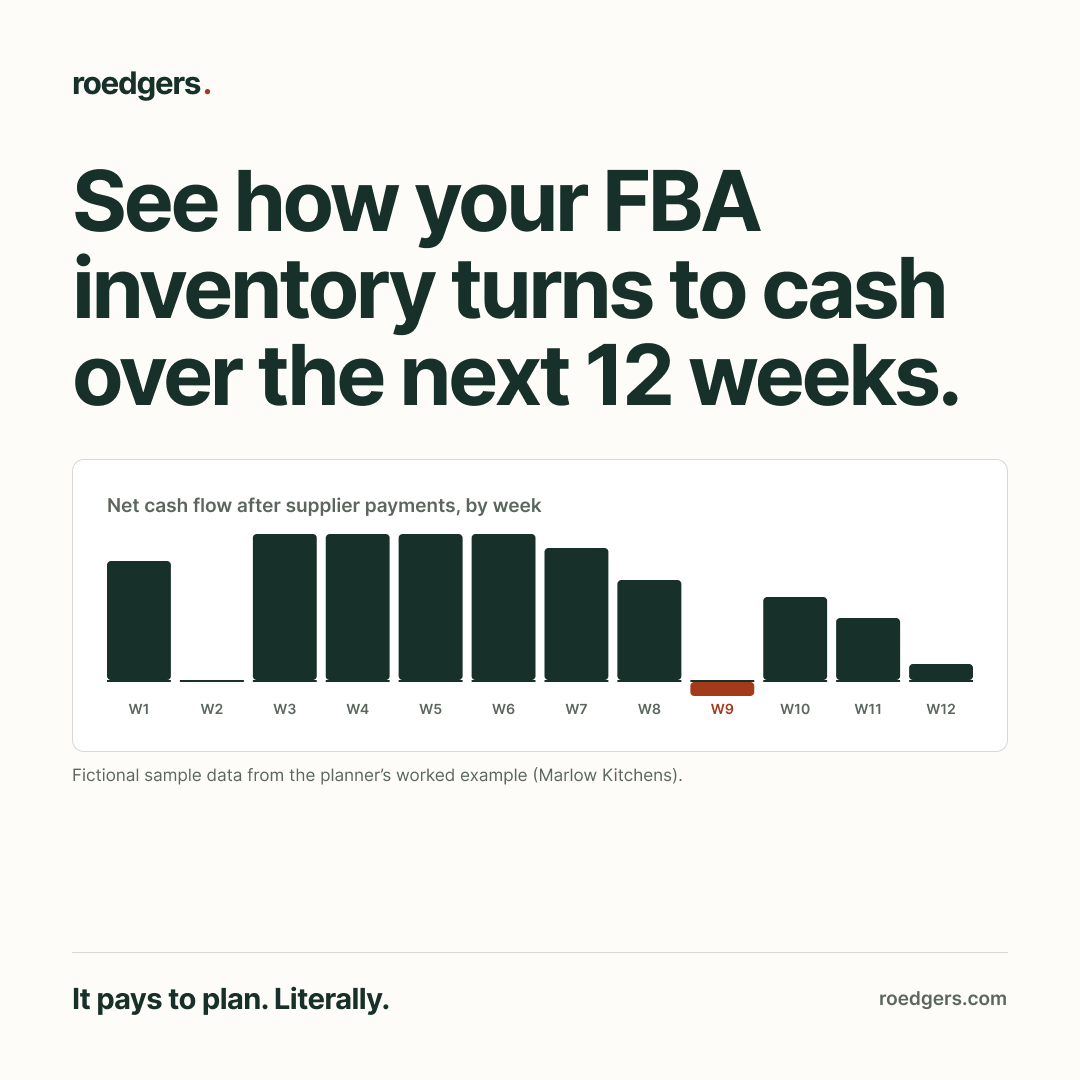
See how your current inventory is expected to generate cash over the next 12 weeks and where planned reorder payments fall along the way.

See what needs reordering

See what needs reordering

Review product-level actions and weekly flags to identify the next purchasing decisions.

Find the weeks that need attention

Find the weeks that need attention

Compare expected receipts and planned payments week by week, and spot where you may encounter a shortfall.

What customers say

"The most useful part was seeing how the assumptions affected the financial picture. I could work through the implications before committing to a decision."

"There’s a lot of detail behind it, but I could follow the analysis and understand what to do next. It made a complicated review much easier to work through."

"Awesome combination of deep expertise with practical advice. This helped us make meaningful decisions."

From Amazon reports to your next inventory decisions

Populate your products first, review the inputs, then calculate the forecast in Google Sheets.

Refresh the plan weekly with fresh reports and reviewed inputs to update the next 12 weeks.

1. Bring your reports

Gather your Amazon exports and the costs and expenses that sit outside Amazon. The guide explains what to collect.

2. Add the business context

Let your AI guide you through the questions, or enter your inputs DIY in Google Sheets. The analytical engine calculates the financials, scorecard, and valuation.

3. Review your results

Review the cash outlook and product recommendations. Investigate flagged inputs, change assumptions, and rerun to compare outcomes.

What's inside

A Google Sheets planner with setup guidance and a worked example, built around the decisions behind your next orders.

DIY workbook Enter your business inputs, run the analysis, and explore scenarios in a familiar spreadsheet so you can work through the numbers yourself.
Guided AI skill Have your AI help you collect your reports, ask about costs and business context, and submit your inputs to the engine so you can work through the forecast in a conversation.
Downloadable analysis reports An interactive HTML report, a populated Excel workbook, and a written summary so you can review the findings, keep a record, and bring the analysis into conversations with partners or suppliers.
The forecasting engine Access to the engine that turns your Amazon reports, product costs, and supplier details into a 12-week inventory and cash plan so you can see when your cash is expected back, what to reorder, how much to buy, and when you’ll need the money.
User guides and structured examples Instructions for getting started, plus a fictional business’s source reports, interview, and finished analysis so you can see what to provide and what comes back.

Why I Made This

Don’t make the same mistakes I did

In my first Amazon business, I put too much money into stock that moved too slowly. Then I didn’t replenish my winners fast enough.

The cash I needed to buy more of what was selling was tied up in what wasn’t.

And I made it harder on myself by not watching when money was expected back against when payments were due. I ran into tight cash windows I hadn’t prepared for.

I had inventory. I needed liquidity.

That experience is why I built the Amazon Inventory Planner: to see when cash is expected back, what needs reordering, and how the next purchase fits into the weeks ahead.

Before you put more money on the shelf, look at when you expect to get it back—and what needs paying in the meantime.

I built this because I needed it

I built this because I needed it

Hi, I’m Cyrus. I learned the hard way the cost of these types of reordering and inventory planning mistakes.

After selling my first business, and as I worked on new businesses and with others as clients, I developed a new approach to keep three questions in view:

  • When is the cash tied up in inventory expected back?
  • Which products need replenishing, and how much should we buy?
  • How do those orders fit alongside expected receipts and upcoming payments?

I use this approach to this day to help businesses stay in stock and manage the liquidity needed to grow responsibly.

The Amazon Inventory Planner puts that approach into a 12-week inventory and cash plan you can use for your own business, so you can see what needs ordering and what it asks of your money before you commit.

What this planner helps you decide

What this is:

  • A 12-week plan for reviewing inventory, replenishment, and their projected cash effects.
  • A way to explore assumptions, identify missing inputs, and review suggested orders.
  • A repeatable planning workflow you can refresh as your reports and supplier information change.

What this isn't

  • An automated purchasing system: you choose and place your orders.
  • A guarantee of sales, supplier delivery dates, or Amazon payouts.
  • A complete forecast of your business bank balance or a replacement for your accounting system.

FAQs

Can I start before I know every product cost?

Yes. Populate your products first, then review COGS and planning inputs. You can run with incomplete information; missing inputs are flagged and affected results may remain provisional or unavailable.

Do I need an advertising report?

Advertising data is not required to project inventory sell-through. An advertising report can improve the expense and contribution picture. Review the caveats: expenses that are not included can make projected cash or contribution look higher than the amount you ultimately retain.

What if I don’t know my lead times?

Enter supplier lead and transit times by product, or enable the optional defaults on Assumptions: six weeks for lead time and two weeks for transit. Review these assumptions against your suppliers before placing orders. Blank safety stock uses a 15-day default.

Do I need MOQ and case-pack information?

No. Minimum order quantities and case packs are optional. When supplied, they help determine suggested reorder quantities that fit your supplier’s order constraints.

How often should I update the plan?

Use it as a weekly review. Bring fresh reports, review retained product inputs and supplier assumptions, and clear any opening receipts already received before running the updated plan.

Does it replace my accounting or inventory system?

The planner supports replenishment and cash decisions using your reports and assumptions. Continue using your accounting and inventory systems for records and operations. The forecast covers modeled inventory activity, not every movement in your bank account.

What happens to my uploaded files?

Selected files stay in the open sidebar until you close it. When submitted, the service processes them in memory and retains only run metadata. Your planning inputs and results remain in your Google Sheets workbook; uploaded report files are not stored by the calculation service.

Do I need AI or desktop Excel?

You can use the planner in Google Sheets. The Roedgers engine performs the calculations, and new forecasts require an internet connection. Desktop Excel and an AI assistant are not required for that workflow.

What reports should I start with?

Start with your FBA inventory report to populate products. Add financial transactions to strengthen the financial picture; Business Report and advertised-product data can provide additional context. Review detected report types and any missing-input flags before relying on the plan.

Where can I get help?

Use the setup guidance and worked example to review the workflow. For help with access or using the planner, email team@roedgers.com.

Buy smarter. Keep your winners stocked. Give your cash room to work.

See what needs replenishing, what the suggested orders could cost, and how those payments fit alongside expected cash receipts.

Get the Amazon Inventory Planner

Amazon Inventory Planning AI Power-Up

Regular price $249.00 USD
Regular price Sale price $249.00 USD
Add to cart
Regular price $249.00 USD
Regular price Sale price $249.00 USD
Add to cart